Karpathy method 6 AI CLIs Mac · Win · Linux

Your AI setup,
booted like an operating system.

AI-OS is the single source of truth for everything AI in your dev workflow. Spec → Verifier → Environment as real workflows, ~300 skills shared across every CLI, MCP servers as declarative YAML — all restored with one command.

// new Mac to full AI setup in ~5 minutes.

6
AI CLIs, one config
300+
skills, symlinked
10
MCP servers (YAML)
1
command to rebuild
// 01 · what is it

The answer to “I just got a new Mac. How do I get my AI setup back?”

Most devs who use AI assistants daily end up with skills scattered across ~/.claude/, ~/.codex/, MCP servers hardcoded with no version control, and the Spec→Plan→Execute→Verify loop living only in their head. AI-OS puts all of it in one git repo.

METHOD

Spec → Verifier → Environment

Karpathy's framework as 5 recurring workflows, 3 hard rule-sets, and 3 verifier gates applied after every task.

SKILLS

One source of truth, every CLI

14 required superpowers + ~300 curated & vendored skills, symlinked into Claude Code, Codex, Gemini, Antigravity, Hermes & MiniMax.

CONFIG

MCP + dotfiles as code

10 MCP servers as declarative YAML, generated at install. zsh, Warp, Brewfile & git config versioned in the same repo.

CI

Proven on 3 runners

macOS, Linux & Windows CI validate the install scripts on every PR. The setup is idempotent and has a dry-run mode.

// 02 · what it does

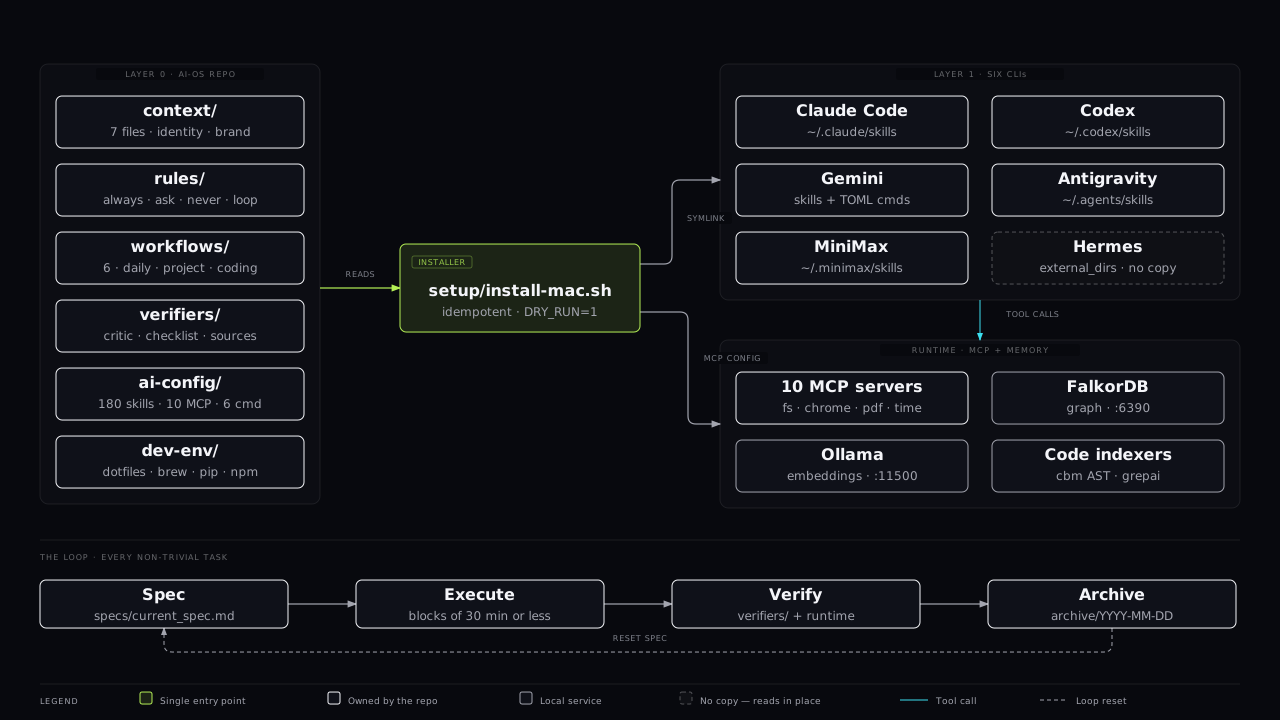
Three layers, symlinked top to bottom.

Skills and config flow down from a single repo into every CLI, and every CLI reads from the same shell & system underneath.

// layer 0 — ai-os

The repo that owns everything

18 master instructions in CLAUDE.md, 5 workflows, 3 rules, 3 verifiers, flat global skills + optional ECC / claude.tools bundles, and a replicable dev-env. Change it here, it propagates everywhere.

// idempotent

Run it twice, safely

The installer never breaks on re-run. DRY_RUN=1 simulates the whole thing without touching your system.

// layer 1 — clis

Claude Code · Codex · Gemini · Antigravity · Hermes

Each CLI reads skills from its own home dir — but those dirs are symlinks back to AI-OS. One edit, six assistants updated.

// layer 2/3

Shell & system

zsh + Oh My Zsh + p10k + Warp on Mac, PowerShell + Windows Terminal on Windows, Homebrew / apt underneath.

// 03 · the method

Every non-trivial task runs the same loop.

Spec quality first, verifier passes second, runtime evidence third. No “it builds, ship it.”

Spec

Define the objective

One active spec: objective, acceptance criteria, non-goals, risks.

Plan

Break into blocks

Blocks of ≤30 min, dispatched in parallel when independent.

Execute

Block by block

Verify after each block. Sub-agents self-report; you check the handles.

Verify

6 gates per task

Quality checklist, self-critique, source-check. Evidence before “done”.

// 04 · install

Clone. Run one script. Verify.

Pick your OS. Copy the block. Most of the 30–60 min first install is just downloading packages.

# 1. clone
git clone https://github.com/eddremonts86/ai-os ~/Projects/ai-os
cd ~/Projects/ai-os

# 2. install everything (Mac)
bash setup/install-mac.sh

# 3. verify (12 health-check sections)
bash setup/verify.sh

Prerequisites

  • Apple Silicon / Intel Mac, Windows 10-11, or Linux
  • git, curl and an internet connection
  • ~30–60 min for the first run (mostly downloads)

Optional layers

  • setup/install-ecc.sh — +271 ECC skills
  • setup/install-claude-tools.sh — +12 claude.tools / gstack skills
  • DRY_RUN=1 — simulate without touching your machine
// end of boot

Reboot your workflow.

Stop reconfiguring six CLIs by hand. Put the method, the skills and the environment in one repo — and bring it back in one command.